// Docs
Your account
Signing in
Downloading G-code needs a free account. Sign in with Google, or with your e-mail: we send a 6-digit code (also in the e-mail's subject) to type in MillPath, and a link that does the same. Both work once, for 20 minutes. No password.
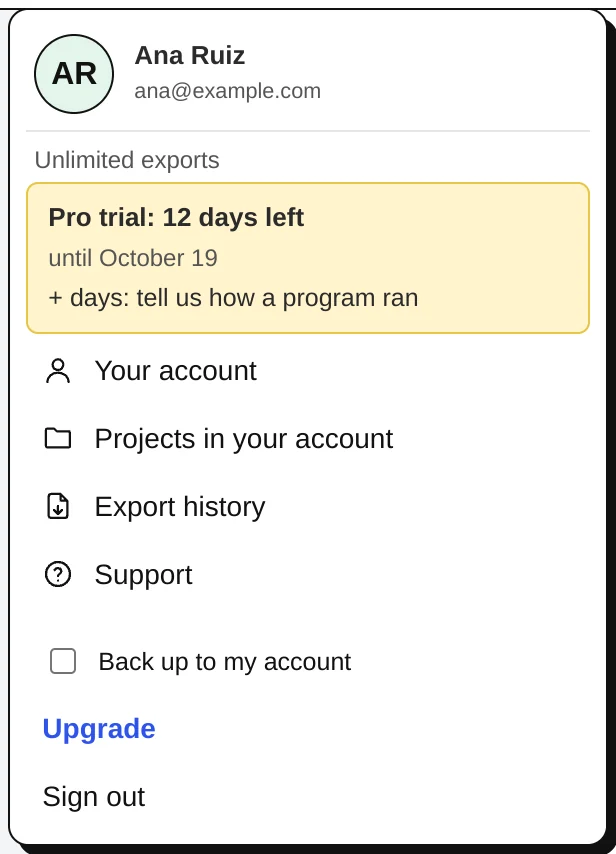
Signed in, the button at the top right shows your initials and your plan (here: the trial with its days left). Its menu opens Your account (plan, billing, settings), Projects in your account, Export history, Support (your questions and our answers), the Back up to my account switch, Upgrade and Sign out.
The yellow box during the trial says when it ends, and that a report on how a program ran adds days of Pro.
Plans
- Every new account starts with 15 days of Pro: everything, unlimited.
- Then Free: every operation, simulation and checks, all posts, and 2 G-code exports a day (the same project again within 24 hours does not count).
- Hobby: unlimited exports for personal use. Pro: commercial use and nesting on sheets. One plan covers every machine. See Pricing.
The days left show on the account button; reporting how a program ran adds days of Pro to a free account (Reports and feedback).
Backup and history
With Back up to my account on, your projects, tool library, posts and shop settings (remnants, quote rates, part sizes) are kept in your account and open on any computer. Export history keeps the G-code you exported. Without backup, projects stay in this browser only.
A shared computer
Signing out removes your work from the browser (it stays in your account); if it is not backed up, MillPath asks first. When someone else signs in on the same browser, what the last person left is cleared before anything shows.
E-mails
A welcome, a question the day after your first export, and notes before and after the trial ends. Each has a link to stop them. Product news only if you ask for it.