// Docs
Tools and feeds
Tool types
| Type | Used for |
|---|---|
| Flat end mill | Profiles, pockets, adaptive, rest, bores, facing. Diameter and flutes; "center cutting" if it can plunge straight down. |
| Bull nose | A flat end mill with a corner radius: 3D roughing and finishing, stronger corners than a sharp end mill. |
| Ball end mill | Rounded floors and fillets, 3D finishing. |
| Drill | Holes the size of the drill. Point angle (118° is common) sets the tip length for through holes. |
| Chamfer mill | Chamfers and countersinks. Angle and tip diameter. |
| V-bit | V-carving, engraving, countersinks. Angle (60°, 90°…) and tip diameter. |
| Thread mill | Thread milling (single profile). |
| Tap | Tapping on controllers with synchronised tapping (LinuxCNC). |
| Roundover bit | Rounded edges. Radius and tip (small end) diameter. |
Adding a tool
New tool (under the tool list, or + New tool in an operation) first asks what kind of cutter it is, with a picture of each. Opened from an operation, the kinds that suit it come first and the new tool is set on it. Nothing is added until you pick a kind.
The editor draws the tool to scale as you type: diameter, corner radius or angle, flute length, and the stick-out below the holder when a holder is set. A name MillPath made (Ball 6 mm 2F) follows the size; a name you typed stays. Duplicate copies a tool to make a similar one.
Choosing the tool for an operation
The operation shows its tool as a card with its picture. Click it to choose from the tools that suit the operation; the rest are listed as not suitable. When a cut goes deeper than the tool's flute length, the operation says so.
Tools picked for what is found
When a drawing is opened, Found in the drawing lists its holes, outlines, slots, inner shapes and text, and under each one the tool its suggestion will use. MillPath picks it from the project's tools and your tool library:
- A hole gets a drill of exactly that size, from the project or your library.
- A pocket, slot or inside cut gets the largest end mill that fits the shape, long enough for the depth when its flute length is set. The outline gets an end mill up to 12 mm, the top of the stock the largest flat tool (your face mill), chamfers a chamfer mill or V-bit.
When none of your tools fits (no drill of that size, no end mill small enough), MillPath makes a new one of a usual size with the feeds of your nearest similar tool, adds it to the project and says so. The row shows it in yellow before you apply. Check its feeds, and save it to your library if you have that tool.
A library tool the project does not have yet is added to it with the library's number and feeds, and the message says which. So the more of your real tools are in the library, the better the choice. While the library is empty, the panel reminds you.
Tool settings
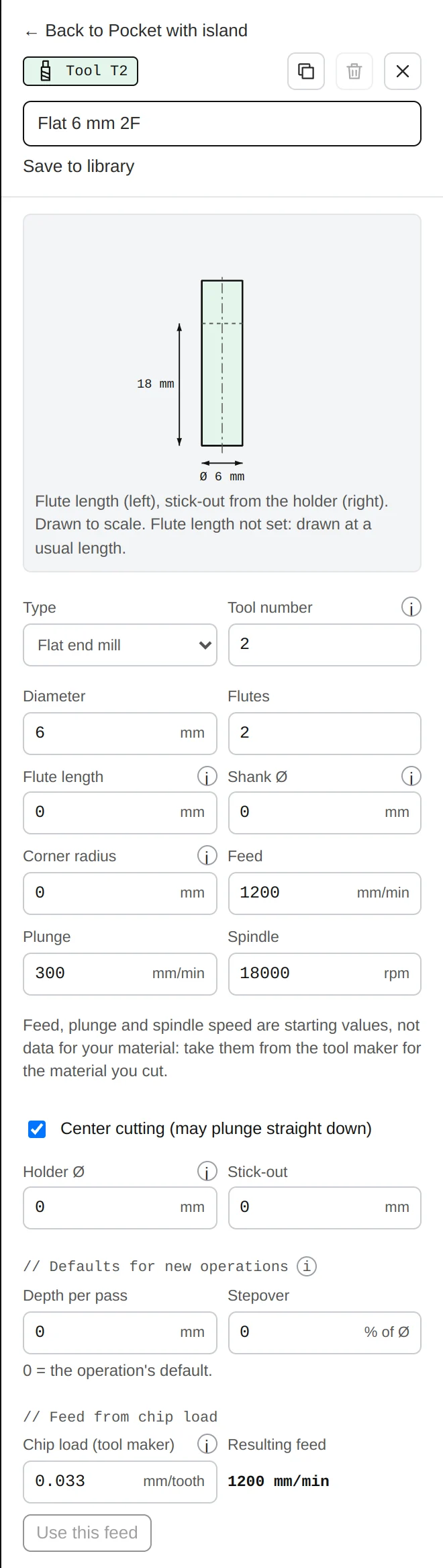
Edit a tool from its operation (Edit T2) or from the tools list. The drawing shows it to scale: flute length on the left, stick-out from the holder on the right. Save to library keeps it for every project. The settings:
- Number: the T number written in the G-code; it must match the tool's place in your machine. Changing it updates the operations that use the tool.
- Flute length and shank diameter: for the drawing and the depth warning (optional).
- Holder diameter and stick-out: with both, the safety checks look for the holder running into walls.
- Diameter, flutes, and for pointed tools the point angle and tip diameter.
- Feed, plunge, spindle: cutting feed, plunge feed and RPM.
- Depth per pass and stepover: this tool's defaults: a new operation, or changing an operation to this tool, takes them.
- Keep this tool for every project: puts it in your library.
Feed from the chip load
A tool maker gives a chip load: how thick a chip each cutting edge should take, for a material and a tool size. The feed follows from it:
Example: a 6 mm two-flute end mill at 18,000 RPM, with a chip load of 0.05 mm per tooth: 18,000 × 2 × 0.05 = 1,800 mm/min. In inches: 1/4" two-flute at 18,000 RPM and 0.002" per tooth gives 72 in/min.
In the tool editor, // Feed from chip load does this sum and Use this feed applies it. Too small a chip rubs and burns; too large breaks tools. Start from the tool maker's figure for your material, lower when in doubt.
Starting values
The tools MillPath starts with are examples with starting values, not data for your material. Replace them with your own tools and your tool maker's figures. See also Safety.
Library and presets

Library keeps your tools for every new project. A preset saves an operation's settings together with its tool (Save as preset in an operation) to reuse on other jobs.